Important notification on data privacy and cookie notice
We use cookies to ensure you get the best experience on https://www.sunlifegrepa.com. By continuing to browse our site, you are agreeing to our use of cookies.
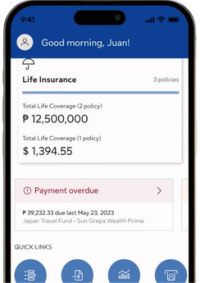
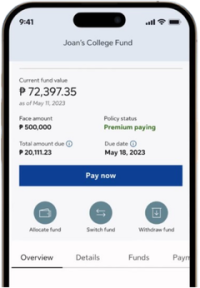
The new My Sun Life Grepa mobile app is your go-to digital hub for managing your Sun Life Grepa policies, payments and personal information —all in one place.
We’re excited to bring the Client Portal to you soon!
Our team is currently working on its rollout, and we will send out communications as soon as it becomes available. Thank you for your patience and support. Stay tuned for updates!
We’ve rebuilt the platform to provide a faster, more secure, and more seamless digital experience, with improved performance and shorter loading times.
Yes. Protecting your personal information is our highest priority.
The retirement of the previous Client Portal and Mobile App is part of a proactive upgrade to strengthen digital infrastructure and security. Your policy information remains securely maintained within Sun Life Grepa’s internal systems through the transition.
No. If you are an existing client, download the new My Sun Life Grepa Mobile App and log in using your registered email address or username, if you have one, and your existing password.
Yes. Your profile details will automatically sync when you log in to the new app. To meet enhanced security and compliance standards, all users—including existing clients—must complete a quick identity verification.
If your registered mobile number is no longer active or up to date, please call us at (02) 8849-9633 or email wecare@sunlifegrepa.com for assistance in updating your contact information. Once your mobile number has been updated, you can log in and receive the OTP on your new mobile number.
No. Your policy will not be affected if you do not sign up for the app. The app simply gives you convenient digital access to your policy information and services anytime, anywhere.
Download My Sun Life Grepa and tap “Create an account”.
Enter your Policy/Plan Number and Date of Birth.
Create a username and password.
Verify your identity by taking a photo of your valid government-issued ID and a live selfie.
Tips: Use your device’s camera. Make sure the ID uploaded matches the type you selected. Scanned copies are not accepted. For the list of accepted government-issued IDs, click here.
Enter your mobile number and tap “Yes, send OTP”.
Enter the One-Time PIN sent by SMS from “OKTA”.
Create your six-digit passcode.
*After registration, you may log in using biometrics or your passcode.
1. Download My Sun Life Grepa app and tap “Log in”. 2. Enter your registered email address or current username, if you have one, and your existing password. 3. Verify your mobile number using the SMS One-Time PIN.
Tip: Use an active Philippine mobile number that can receive the OTP. If you no longer have access to your old number, call Client Care at (02) 8849-9633 or email wecare@sunlifegrepa.com.
If you cannot log in, select “Forgot Username or Password?”. If you stil need help, call (02) 8849-9633 and press #1 , or email wecare@sunlifegrepa.com
We protect your data and privacy through several safeguards:
Secure capture: Your ID and selfie are securely processed by our trusted partner and are not saved to your phone’s photo gallery.
Data minimization: We collect only the information needed for identity verification, and your personal data is never sold to third parties.
Regulatory compliance: The verification process complies with the Philippine Data Privacy Republic Act No. 10173, ensuring your personal data is protected and your privacy rights are respected.
On the Service Request page, select “Manage Beneficiaries” and choose the policy.
Add, remove, or update a beneficiary and complete the required information.
Download, complete, and upload the required consent forms and valid ID. If documents are missing, tap “Save for later.” Saved drafts are automatically deleted after 10 days.
Review the information, tap “Continue,” and complete the final OTP verification.
Track the request under the “Track” tab on the Service Request page.
For an irrevocable beneficiary, prepare the beneficiary’s valid ID, signed consent form, and a photo of the beneficiary holding the consent form.
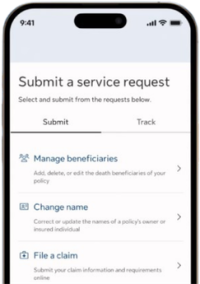
Select a request type: Manage Beneficiaries, Change Name, or File a Claim.
Complete the digital form and provide the required information.
For a Hospital Income Benefit claim, select your preferred payout method and upload the supporting documents.
Tap “Submit” and complete the OTP verification.
Track your submission under the “Track” tab on the Service Request page.
Tip: If documents are missing, tap “Save for later.” Saved drafts are automatically deleted after 10 days. For help, call (02) 8849-9633 and press #1, or email wecare@sunlifegrepa.com.
My Sun Life Grepa requires a supported operating system to provide optimal performance, security, and access to the latest features. Your device must use:
iOS 17 or later for Apple devices.
Android 14 or later for Android devices.
If your device uses an older version, you may be unable to install or open the app. For help with inquiries or service requests, call (02) 8849-9633 and press #1, or email wecare@sunlifegrepa.com.
Yes. Delete the old Sun Life Grepa PH app and download the new My Sun Life Grepa mobile app to continue accessing your account and use the latest features and enhancements.